As you may know, email spoofing allows attackers to pose as someone else to gain illegal profit. For example, I only use [email protected] for communication, but someone might create a spoofed-up email, say [email protected], to trick someone. This is called email spoofing with fake headers as follow:
Date: Thu, 24 Oct 2021 12:46:10
From: nixCraft <[email protected]>
Reply-To: [email protected]
To: <my@personal_gmail_com>
Correct headers are often not checked by receiving email servers, and my@personal_gmail_com may think the email is from me. Here is the thing I don’t use opensourceflare.com for email communication at all. So how do I prevent illegitimate email traffic on my domain? In this tutorial, I will explain how to configure DNS settings that tell receiving email servers this domain is not configured for emailing purposes and the attacker maliciously sending email on my behalf.
Contents
Warning: Any DNS misconfiguration will result in email not being delivered. Hence, make sure you are setting the following records only if you are not sending and receiving any email on your domain. The author is not responsible for any misconfigurations. In case if you set such a record by mistake despite reading this scary warning, monitor the email log and delete the DNS record to undo action.
Setting up a NULL DNS MX record
MX is an acronym for mail exchange. It directs emails to the correct mail server. Often we have multiple MX records for a domain. For example, you can use the host command or dig command to get a list of all MX records:
host -t MX {your-domain-here}

dig MX {your-domain-here}

dig +short MX {your-domain-here}

host -t MX cyberciti.biz

dig +short MX cyberciti.biz
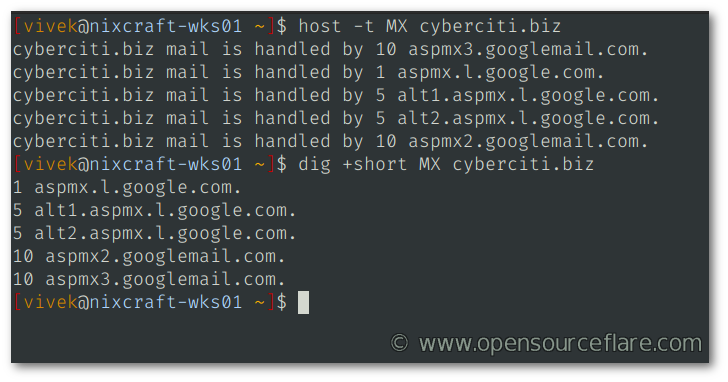
A DNS MX for my main email server pointing to Gmail app server
Action to take
So when you are not sending and receiving email, you set MX to NULL.
dig +short MX opensourceflare.com

host -t MX opensourceflare.com
Sample outputs:
opensourceflare.com mail is handled by 0 .
Here is how to set up NULL MX records for domain:
opensourceflare.com. 1 IN MX 0 .
So now, if someone tries to send or spoof, say using [email protected], they will get an error depending upon smptd software:
DNS Error: 913429 DNS type 'mx' lookup of opensourceflare.com responded with code NOERROR The domain opensourceflare.com doesn't receive email according to the administrator: returned Null MX https://www.rfc-editor.org/info/rfc7505
More unfriendly responses look as follows:
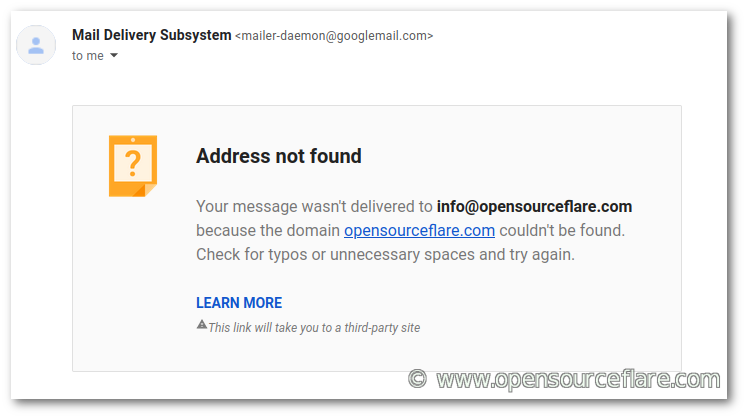
Gmail response
Setting up a DNS SPF record
Use Sender Policy Framework (SPF) to help protect your domain against spoofing, and help prevent your outgoing messages from being marked as spam. Here is how it looks SPF for cyberciti.biz where only AWS SES and Google/Gmail are allowed to send an email on behalf of my domain. It contains a list of all the IP address or includes another DNS record:
host -t TXT {your_domain_com}

dig TXT {your_domain_com}

host -t TXT cyberciti.biz

dig TXT cyberciti.biz
Sample outputs:
cyberciti.biz descriptive text "v=spf1 include:amazonses.com include:_spf.google.com ~all"
The following IP addresses are taken from the includes and IP4/IP6 directives within this domains SPF record:
cyberciti.biz.
amazonses.com
199.255.192.0/22
199.127.232.0/22
54.240.0.0/18
69.169.224.0/20
23.249.208.0/20
23.251.224.0/19
76.223.176.0/20
54.240.64.0/19
54.240.96.0/19
52.82.172.0/22
_spf.google.com
_netblocks.google.com
35.190.247.0/24
64.233.160.0/19
66.102.0.0/20
66.249.80.0/20
72.14.192.0/18
74.125.0.0/16
108.177.8.0/21
173.194.0.0/16
209.85.128.0/17
216.58.192.0/19
216.239.32.0/19
_netblocks2.google.com
2001:4860:4000::/36
2404:6800:4000::/36
2607:f8b0:4000::/36
2800:3f0:4000::/36
2a00:1450:4000::/36
2c0f:fb50:4000::/36
_netblocks3.google.com
172.217.0.0/19
172.217.32.0/20
172.217.128.0/19
172.217.160.0/20
172.217.192.0/19
172.253.56.0/21
172.253.112.0/20
108.177.96.0/19
35.191.0.0/16
130.211.0.0/22
Action to take
Now take a look at opensourceflare.com SPF records:
host -t TXT opensourceflare.com
Outputs:
opensourceflare.com descriptive text "v=spf1 -all
The SPF is always set to fail. In other words, no IP addresses are authorized to send an email on behalf of my domain and here is how to set such record:
opensourceflare.com. 1 IN TXT "v=spf1 -all"
Setting up a DKIM record
We set up a DKIM DNS record to prevent email spoofing on outgoing messages sent from your domain. For example:
host -t TXT google._domainkey.cyberciti.biz
Sample outputs:
google._domainkey.cyberciti.biz descriptive text "v=DKIM1; k=rsa; p=MIIBIjANBgkqhkiG9w0BAQEFAAOCAQ8AMIIBCgKCAQEAlXtL1tL+0WrwdEldIO0ZED1hmaQJ9AcAA/eN3wMDUd723+MSR+vIqOrp2Bu5rKIPvm3IdADx+Av5UGmQ1UwU/TuJR+T+p5nW9bymUgJGqM8pp+Pg+YPsD4EEu+ClBwt8gExE6BYM/CK17djlrBnv9vbzUkK9IvhGr1UggUaz9N3BDCPRq/0PAhDYiwm18QN+s" "S8j8I3Iuv25oSUz20NYQ2R4PEZFN6dQcPuuwYCC0Ntjip2r/vonwv4LBFgqjEBJfyeuPlGiE+KagxtAI5s1lvIGNGw937vT5FkpmMXe0czJKrKEm0j/RiKb1fgYbjGJndX9x2uNELcqCwP2NQ06PwIDAQAB"
So I set up DKIM that adds an encrypted signature to the header of all outgoing messages. Email servers that get signed messages use DKIM to decrypt the message header, and verify the message was not changed after it was sent.
Action to take
Here is how to set up NULL DKIM for your domain:
*._domainkey.opensourceflare.com. 1 IN TXT "v=DKIM1; p="
Verify it:
host -t TXT *._domainkey.opensourceflare.com
Sample outputs:
*._domainkey.opensourceflare.com descriptive text "v=DKIM1; p="
Where,
- *._domainkey.opensourceflare.com : DKIM selector is set to wildcard.
- v=DKIM1, : Identifies the record retrieved as a DKIM record. It must be the first tag in the record.
- p : This is set to NULL again. It means public key has been revoked or not set by default. In other words, DKIP set to NULL to prevent email spoofing for all selectors.
Set up DMARC policy
DMRC DNS record helps prevent From: address of an email message forged by an attacker. DMARC also lets you request reports from email servers to find possible authentication issues and malicious activity for messages sent from your domain. Here is how it looks for my domain:
dig TXT _dmarc.cyberciti.biz

host -t TXT  _dmarc.cyberciti.biz
Sample outputs:
_dmarc.cyberciti.biz descriptive text "v=DMARC1; p=reject; pct=100; rua=mailto:[email protected]; ruf=mailto:[email protected]; fo=1; ri=2419200;"
Action to take
Set up dmarc as follows for your domain:
_dmarc.opensourceflare.com. 1 IN TXT "v=DMARC1; p=reject; sp=reject; adkim=s; aspf=s;"
Where,
- _dmarc.opensourceflare.com. : Set up DMARC.
- v=DMARC1; : It must be the first tag in the TXT list indicating DMARC version.
- p=reject; : Set REJECT policy to email that fails the DMARC test.
- sp=reject; : Set REJECT policy to email that fails the DMARC test for sub-domain.
- adkim=s; : Set alignment Mode for DKIM to strict
- aspf=s; : Set alignment Mode for SPF to strict
Summing up
Here is the recommended restrictive NULL MX, DMARC, SFP template for your domain that suggests remote (receiving) SMTPd (mail servers) to drop all incoming emails sent from my domain named opensourceflare.com
opensourceflare.com.	1	IN	MX	0 .
opensourceflare.com.	1	IN	TXT	"v=spf1 -all"
*._domainkey.opensourceflare.com.	1	IN	TXT	"v=DKIM1; p="
_dmarc.opensourceflare.com.	1	IN	TXT	"v=DMARC1; p=reject; sp=reject; adkim=s; aspf=s;"
Here is how it looks in Google DNS dashboard:
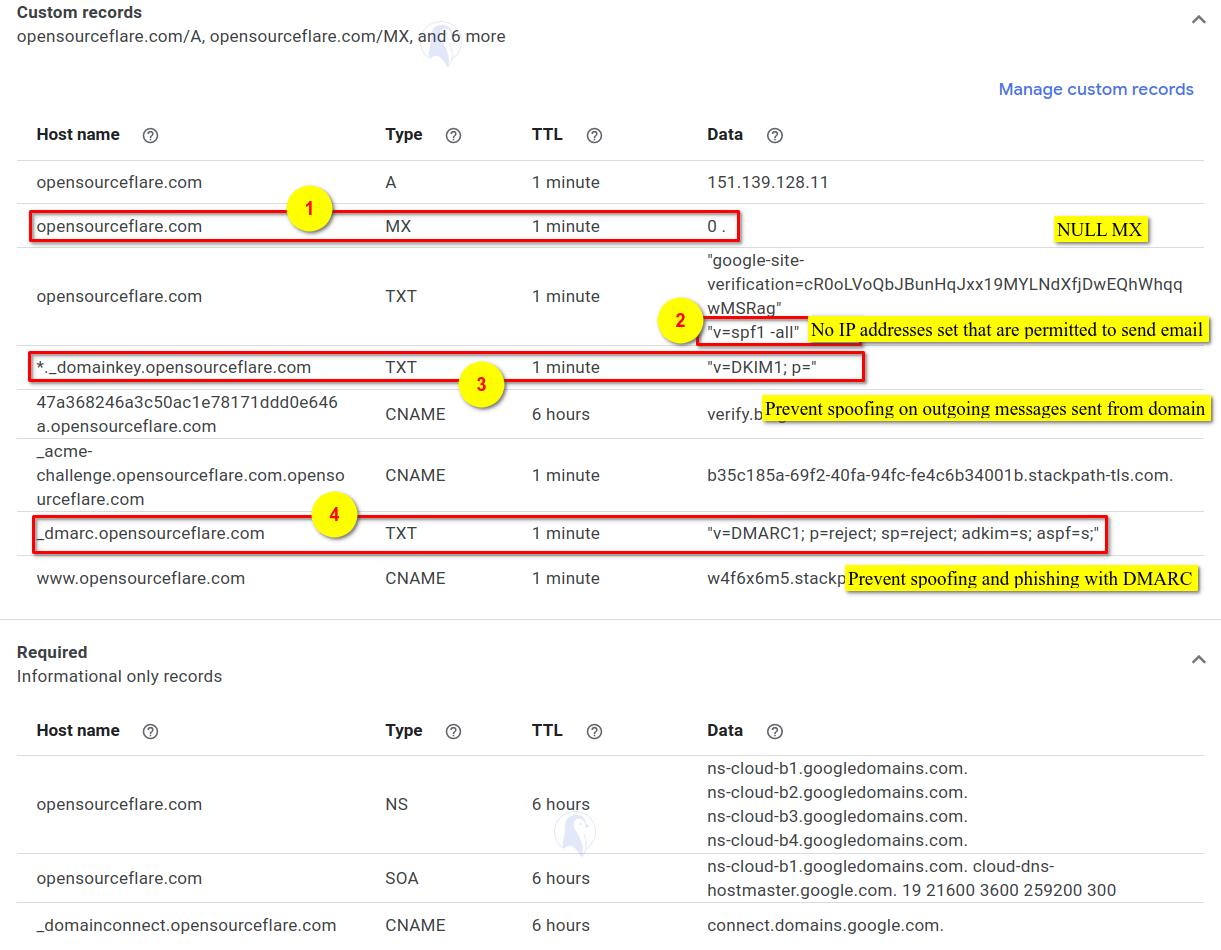
Google domain dashboard with NULL MX and other settings to prevent illegitimate email traffic as I don’t send or receive email on this domain (click to enlarge)
host -t MX opensourceflare.com
host -t TXT opensourceflare.com
host -t TXT *._domainkey.opensourceflare.com
host -t TXT  _dmarc.opensourceflare.com
Recommended readings
I know this topic can be overwhelming to new developers or sysadmin. Therefore, I suggest you read the following pages:
0.01$ isnt but to put in one’s CC for that is something that keeps me from hooking up with many peers.
Alternatives?
You can subscribe to yearly package too.
Very useful information. I just applied those settings to avoid spam issues.
So this prevention method only works if we are someone who is not using our domain’s email address for sending email?
As clarification of: “In this tutorial, I will explain how to configure DNS settings that tell receiving email servers this domain is not configured for emailing purposes”
Which I’m understanding as, “Hey DNS servers, this domain isn’t meant to send emails so don’t accept any emails that end in this domain” and therefore if I really do have a domain I want to use for sending emails this tutorial won’t apply to me, right?
That is to say, I have a domain I send emails from, this tutorial won’t show me how to secure my domain’s emails from being spoofed? Just want to make sure I don’t buy expecting one thing and getting another.
>Hey DNS servers, this domain isn’t meant to send emails so don’t accept any emails that end in this domain
That is correct. It prevent bad guys using your domain which is not meant for emailing purposes at all. HTH